Keel · Guides · Routines & Programs
Group routines into a program
What’s a program for?
"A program is your own grouping of routines you already track. It doesn’t change their schedules." — + › New program: a name, a timeline, and the routines you include.
AvailabilityFree · Pro only for: more than one active program
A program
"A program is your own grouping of routines you already track. It doesn’t change their schedules." It has its own start (and optional end), its own history and cockpit, and a routine may belong to more than one program. Free runs one active program at a time; Pro runs programs side by side.
Steps
- Tap + › New program (shown once a routine exists), or on the Routines sheet tap Group routines into a program / the + menu › New Program.
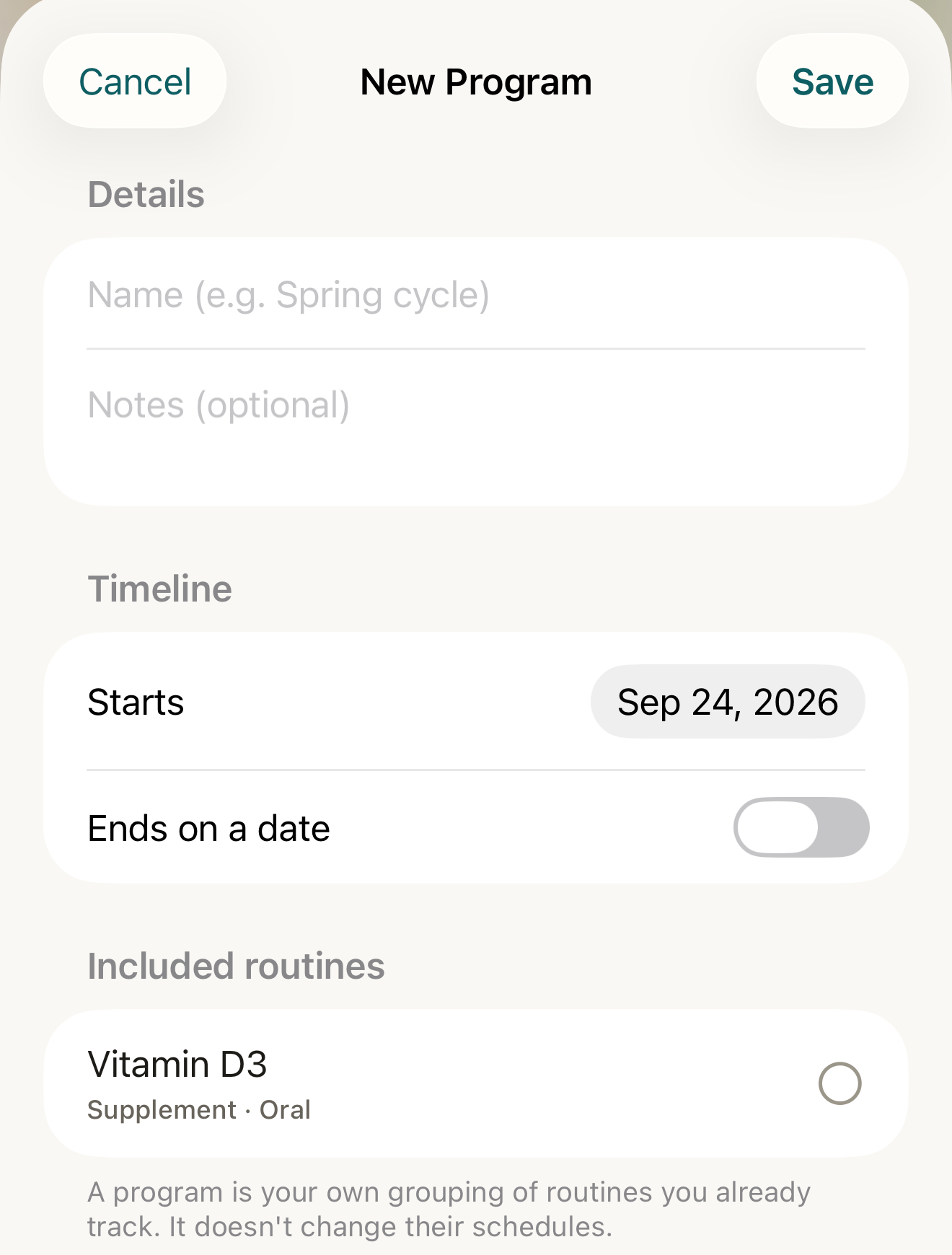
The program form: a name, a timeline, and the routines you already track — grouping only; their schedules are untouched. - Name
- Starts / Ends on a date
- Included routines selection circle
- footer
Where this screen comes from
- File
C4-F1-new-program-form.png(1320×1740);C4-F1-new-program-form.webpis a lossy encode of it- Derivative SHA-256
79dcd332c4a147b34d04f4fb27e3536c3142c11f0b80ac10f1d3aec1bf5371ac- Source
C4-F1.pngin packageKeel-WT-7e41269-guide-figures-B2-20260924-111151-1756- Source SHA-256
18d5068cb445f908093d9a94db5610670848d839337cbd7c8eb7076d94d25ac6- Package seal
f9b0083234734b6b16f58e455596067bde9182e8e0ff62c5e84cdfae8ad22c6f- Captured from
- Keel 1.0.0 (1), implementation
working tree 7e41269 (NOT a candidate; head 7e4126919da3a44a9ad2f2efaf3ad2467c1fbff7, build-input tree c863167fe1474c471d3562fe90f5f107c9598edff3903cdfc58b89bc7ae3032c, build build-20260924-103514-93133) - Operation
- crop x0 y200 w1320 h1740 (source pixels, origin top-left)
The numbered markers are drawn by the page, not into the image.
- Under Details, type the Name (placeholder "Name (e.g. Spring cycle)") and optional Notes.
- Under Timeline, set Starts; turn on Ends on a date for a bounded program.
- Under Included routines, tap each routine’s row to include it — a filled check circle marks an included routine (each row names its category · administration).
- Tap Save.

What changes
The Routines sheet gains an Active program card — its name, dates and "n routines · n doses logged" — and the program’s detail opens from it. The routines keep their own schedules.
Where: The Routines sheet
If it looks different
- Can’t save yet?
- "Give the program a name.", "Include at least one routine.", "The end date must be after the start date.", or, editing an active program, "An active program’s end date must be in the future — use “Mark program completed” to close it out."
- New program opened the Pro sheet?
- Free already has an active program: "Your plan runs one active program at a time. Keel Pro runs programs side by side — or complete the current one first."
- New Program is greyed on the Routines sheet?
- There are no routines yet.
A program is a grouping you name; Keel offers no templates and never suggests which routines belong together.