Keel · Guides · Routines & Programs
Plan a future change
My dose changes next month.
The routine form › Upcoming changes › Plan a change: set the date it takes effect, a new dose and, if needed, a new schedule; doses before that day keep the plan they had.
AvailabilityPro feature — readable on Free
The routine form › Upcoming changes (under More options on a new routine; open on Edit Routine) › Plan a change. On Free the button is a locked row ("A new dose or schedule, starting on a date you set.") that opens the Pro sheet; existing changes stay readable.
A phase
Each change starts a new phase on its date; doses before that day keep the plan they had, and "Anything you don’t change carries over."
Steps
- Tap Plan a change. The sheet is Plan a Change (Edit Change for an existing one).
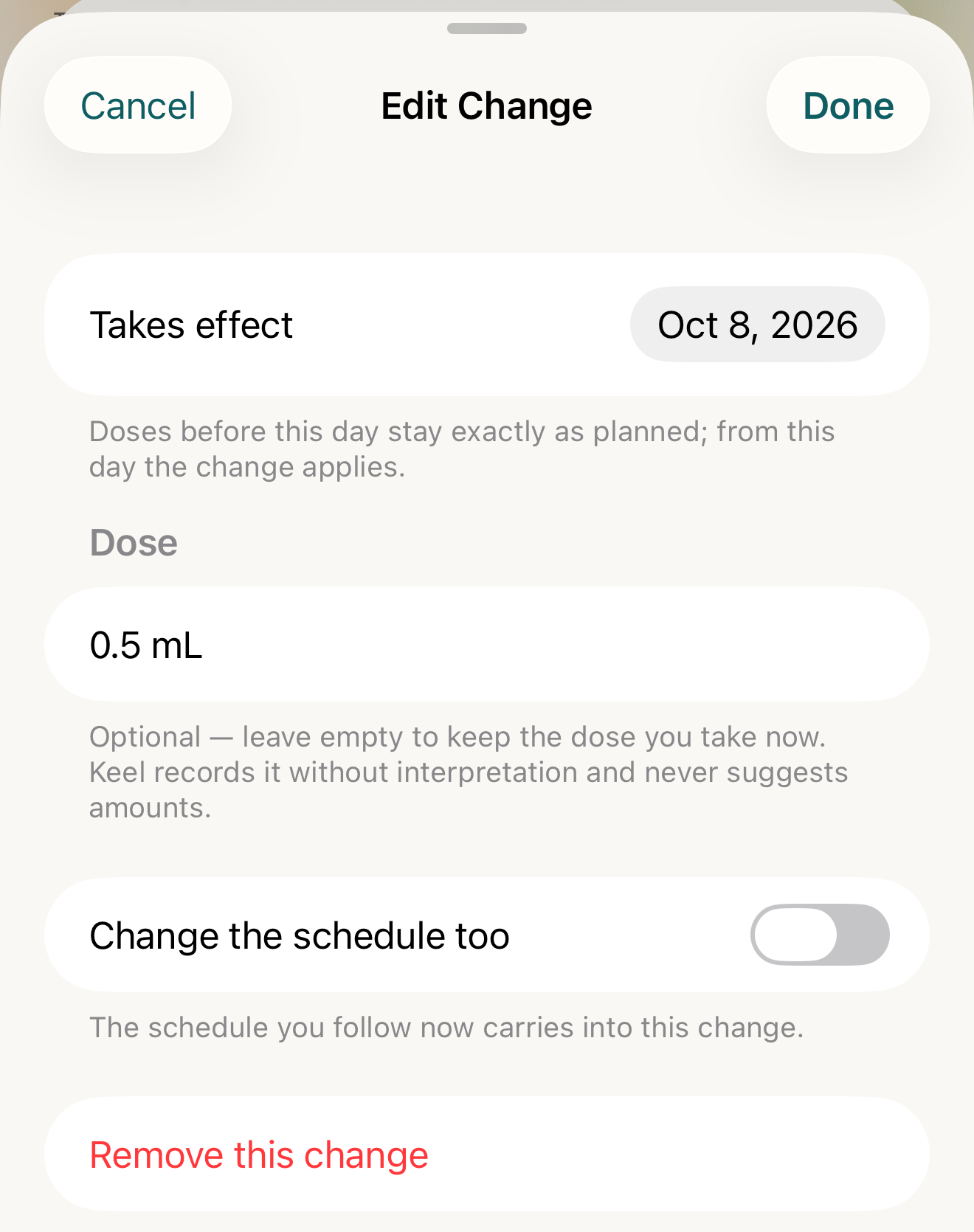
Fictional change: the date it takes effect, the new dose, and a switch for a new schedule; Remove asks before removing. - Takes effect
- New dose
- Change the schedule too
- Remove this change
Where this screen comes from
- File
C3-F2-edit-change-sheet.png(1320×1670);C3-F2-edit-change-sheet.webpis a lossy encode of it- Derivative SHA-256
3cf299f45b6ef322aa0d0a661eb6ba0ff242713722146fec971909632c16481d- Source
C3-F2.pngin packageKeel-WT-7e41269-guide-figures-B2-20260924-111151-1756- Source SHA-256
fa099c491a7259cccd4c65f781a9e0927cddceac5c292b98ee2e1bf861c7878e- Package seal
f9b0083234734b6b16f58e455596067bde9182e8e0ff62c5e84cdfae8ad22c6f- Captured from
- Keel 1.0.0 (1), implementation
working tree 7e41269 (NOT a candidate; head 7e4126919da3a44a9ad2f2efaf3ad2467c1fbff7, build-input tree c863167fe1474c471d3562fe90f5f107c9598edff3903cdfc58b89bc7ae3032c, build build-20260924-103514-93133) - Operation
- crop x0 y200 w1320 h1670 (source pixels, origin top-left)
The numbered markers are drawn by the page, not into the image.
- Set Takes effect — tomorrow or later: "Doses before this day stay exactly as planned; from this day the change applies."
- Under Dose, type New dose (amount + unit) or leave it empty to keep the current dose.
- Turn on Change the schedule too to set a new Repeats, days, times or Any time of day; off, "The schedule you follow now carries into this change."
- Tap Add (or Done), then Save on the form.
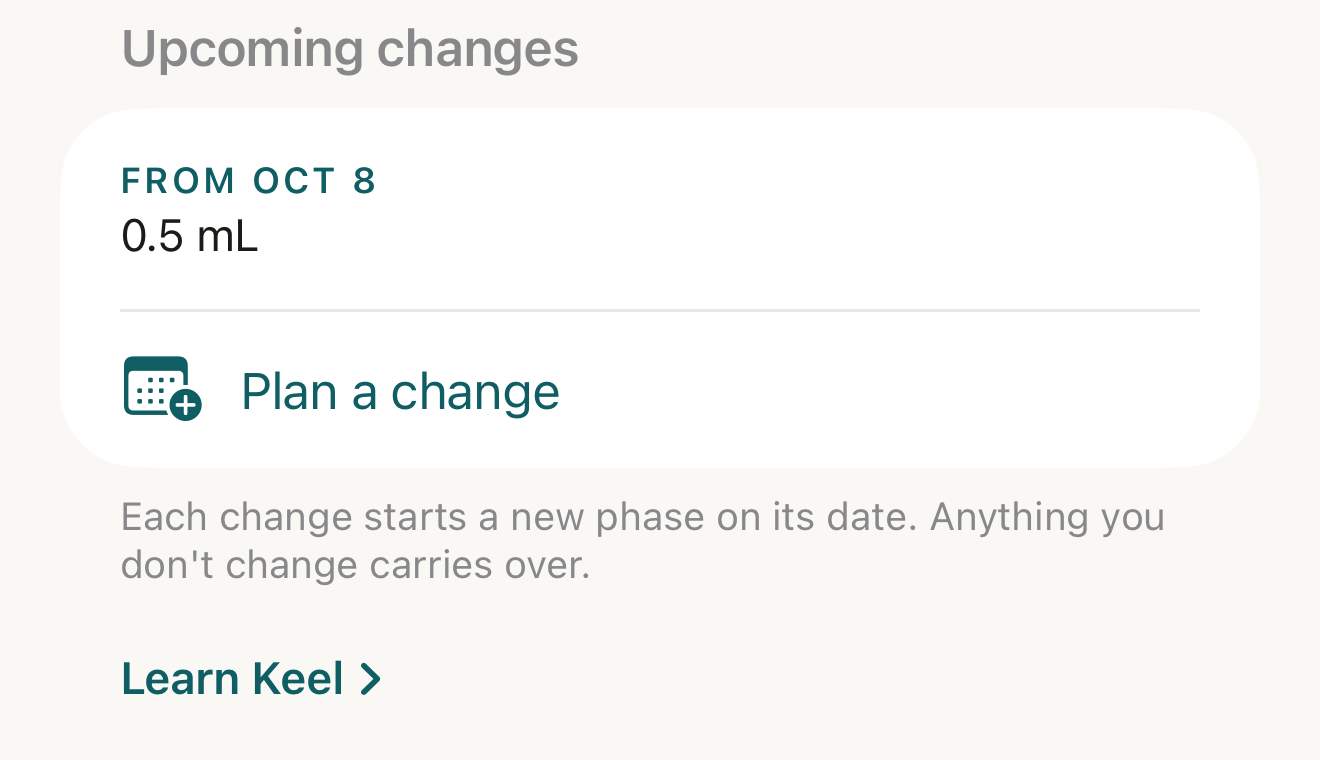
Fictional routine with one planned change: the row names the date and what changes; the footer states what carries over. - From Oct 8 row
- Plan a change
- footer
Where this screen comes from
- File
C3-F1-upcoming-changes.png(1320×760);C3-F1-upcoming-changes.webpis a lossy encode of it- Derivative SHA-256
ba9934dd9282cbdbbe91254357021bb07f7ce665cf58c99ce33d62136c30e1fb- Source
C3-F1.pngin packageKeel-WT-7e41269-guide-figures-B2-20260924-111151-1756- Source SHA-256
73ff95685e0c14c531dfc658cc98c2ed7a0eb68c7b1e0898b4743f04e8a98059- Package seal
f9b0083234734b6b16f58e455596067bde9182e8e0ff62c5e84cdfae8ad22c6f- Captured from
- Keel 1.0.0 (1), implementation
working tree 7e41269 (NOT a candidate; head 7e4126919da3a44a9ad2f2efaf3ad2467c1fbff7, build-input tree c863167fe1474c471d3562fe90f5f107c9598edff3903cdfc58b89bc7ae3032c, build build-20260924-103514-93133) - Operation
- crop x0 y1700 w1320 h760 (source pixels, origin top-left)
The numbered markers are drawn by the page, not into the image.


What changes
The section lists the change as From <date> with its summary (the dose, the schedule, or "Same dose and schedule"). The routine’s detail shows the same From <date> rows and, once governed by a program, a "Changes next · <date> · …" line; the program cockpit reads "<date> — <name> changes to <dose>". Reminders, injection-site rotation and inventory carry over from the current phase on every save.
Where: Upcoming changes on the form, the routine’s detail, and the program cockpit
If it looks different
- On Free?
- Rows carry a Pro badge and open the Pro sheet; only Pro can add, edit or remove.
When the plan can’t be read
- "Recorded before plan history began", "Sync left N competing versions of this plan’s history", "N active programs state different plans for this routine", or "Couldn’t read this routine’s plan." with Try again — the routine’s plan position could not be read cleanly; the plan you saved is unaffected.
Correct a mistake
Open the change › Remove this change › "Remove this planned change?" ("Doses already logged are untouched; the schedule simply keeps its current shape past this date.") › Remove. Swiping the row › Remove removes it from the list with no confirmation.
- Either way the change is only removed from the form’s list — it disappears from the routine when you tap Save on Edit Routine; Cancel keeps it.
A planned change records a dose or schedule you decided; Keel never suggests changing either.