Keel · Guides · Calculators
Read the reconstitution calculator
What do these fields and answers mean?
Tools › Peptide Reconstitution: pick a mode and unit, open each step in the accordion, and read DRAW PER DOSE, CONCENTRATION and DOSES PER VIAL — each a dash until the values it needs are valid.
AvailabilityFree · Pro only for: From Your Routine prefill
Tools › Peptide Reconstitution. It is Free.
Two modes
From water added (you know the water that went in) and Plan the water (you know the draw you want).
The accordion
The steps open one at a time: tap a step’s chevron to open it, again to close; entering a value does not close it, and switching mode opens the first incomplete step. A closed step reads back as one line — "Amount in vial · 5 mg", Not entered yet, Needs a number, or Needs a number above zero.
Steps
- Choose the mode.
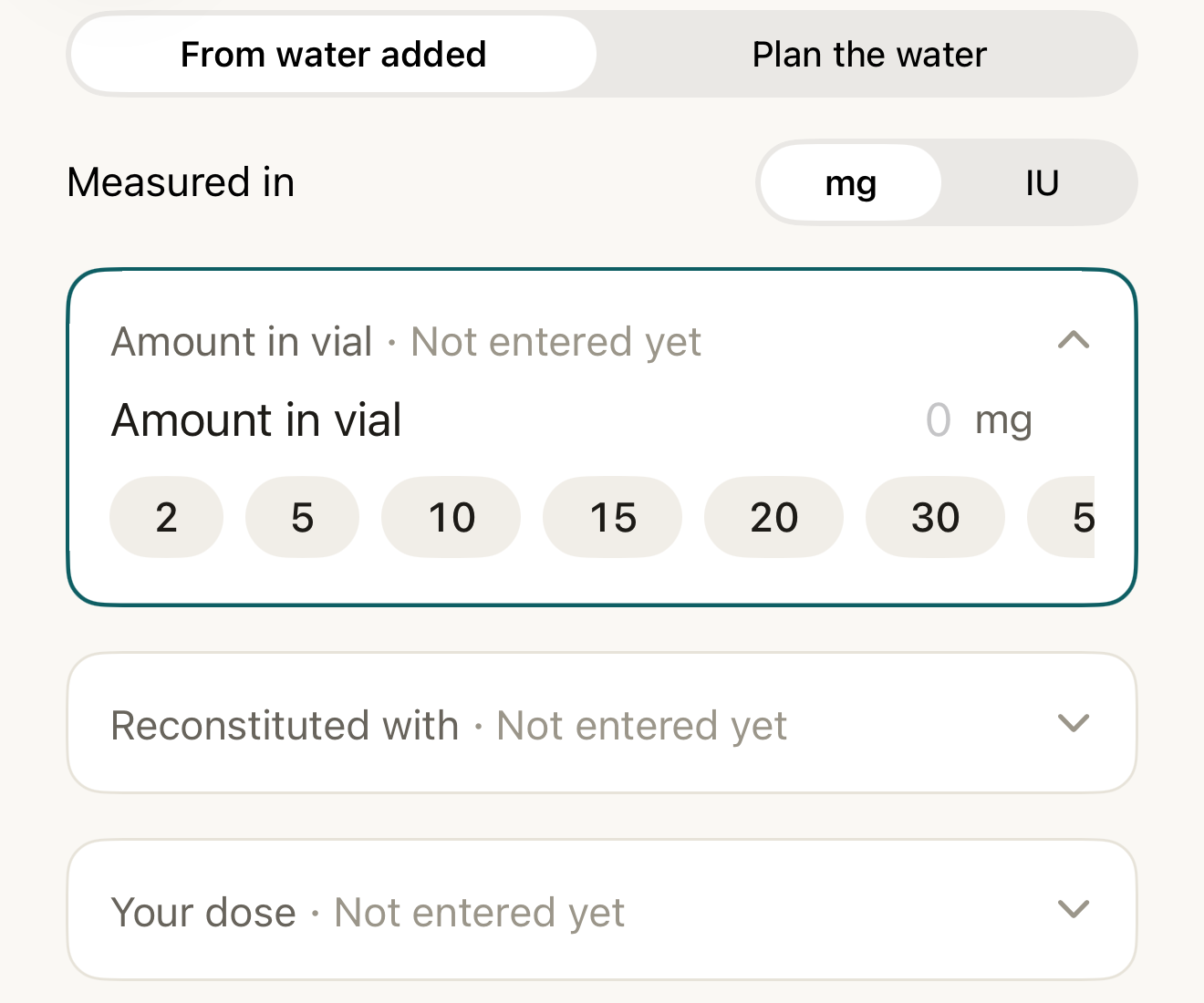
The calculator’s accordion: pick a mode and unit, then open each step; closed steps read back as one line. - mode
- Measured in
- presets
- collapsed steps
Where this screen comes from
- File
G2-F1-calculator-accordion.png(1320×1100);G2-F1-calculator-accordion.webpis a lossy encode of it- Derivative SHA-256
1bf60c0711bc6bc77038d0333049a9feeff1c7cde98c600d7ef2327e6dca40cf- Source
store-5-reconstitution.pngin packageKeel-V1-4cbadaa-store-listing-20260908-1619- Source SHA-256
66dd2fd0a161e7df974212251a4b177406ab518b3617f8fc39eefb6968156e3d- Package seal
bb6bb8cb8f301a369afef5cc37180914f5d7196376f0be585127f6cb51993aa6- Captured from
- Keel 1.0.0 (1), implementation
4cbadaa1c63a0678b61e703583fadc9af226267d(reused-unchanged) - Operation
- crop x0 y385 w1320 h1100 (source pixels, origin top-left)
The numbered markers are drawn by the page, not into the image. Full provenance.
- Set Measured in to mg or IU to match the vial label — it relabels Amount in vial and Your dose only; Reconstituted with is always mL and Draw it lands on always syringe units. Switching later relabels; it does not convert typed numbers.
- Open Amount in vial and enter the amount on the vial (presets 2, 5, 10, 15, 20, 30, 50 mg or 10, 12, 24, 36, 45, 100 IU are shortcuts for a value you already know).
- From water added: enter Reconstituted with in mL (presets 0.5–5). Then Your dose in mcg or IU — never with presets.
- Read the results: DRAW PER DOSE with U-100 UNITS, CONCENTRATION and DOSES PER VIAL.
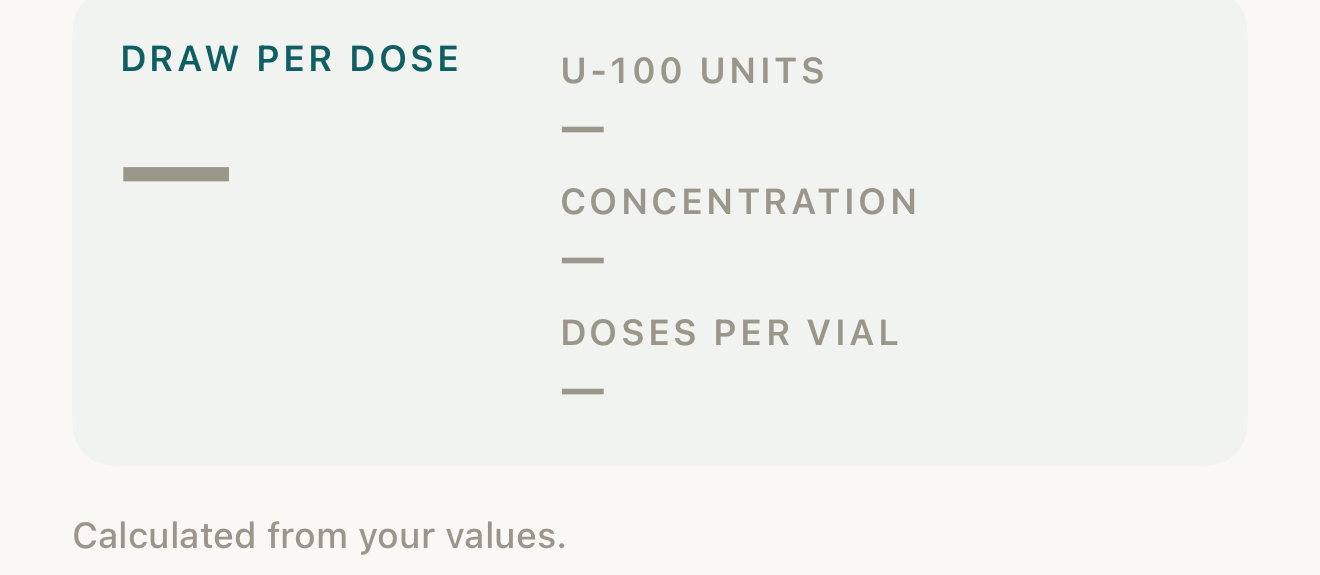
With nothing entered, every result is a dash; results fill in as each needed value becomes valid. - empty results
- the three outputs
Where this screen comes from
- File
G2-F2-results-empty.png(1320×575);G2-F2-results-empty.webpis a lossy encode of it- Derivative SHA-256
7c508dbf6b4cb6191e93049057c2ac401234a2c6dae001edc2d9ba47139ad061- Source
store-5-reconstitution.pngin packageKeel-V1-4cbadaa-store-listing-20260908-1619- Source SHA-256
66dd2fd0a161e7df974212251a4b177406ab518b3617f8fc39eefb6968156e3d- Package seal
bb6bb8cb8f301a369afef5cc37180914f5d7196376f0be585127f6cb51993aa6- Captured from
- Keel 1.0.0 (1), implementation
4cbadaa1c63a0678b61e703583fadc9af226267d(reused-unchanged) - Operation
- crop x0 y1520 w1320 h575 (source pixels, origin top-left)
The numbered markers are drawn by the page, not into the image. Full provenance.


DisclosureFictional example. The values are the app’s own sample inputs, shown to explain how the fields relate; they are not a preparation or a recommendation.
- read-back lines
- DRAW PER DOSE
- DOSES PER VIAL
Where this screen comes from
- File
G2-F3-forward-worksheet.png(1320×1630);G2-F3-forward-worksheet.webpis a lossy encode of it- Derivative SHA-256
ff8b41c16be05442a65e9416fa603406375a95c28006f1b29eb27f3e3f9a2d57- Source
G2-F3-reconstitution-calcdemo-forward.pngin packageKeel-V1-4cbadaa-guide-figures-20260909-1225- Source SHA-256
a0221edb5596494e4c7de03678743951cb56d0e869040bf7cf435e7ba726627e- Package seal
520b2e67328e635e6c12a1afcac1f5e5a9c18cb5346a953f8972e7f1e2da6b15- Captured from
- Keel 1.0.0 (1), implementation
4cbadaa1c63a0678b61e703583fadc9af226267d(reused-unchanged) - Operation
- crop x0 y380 w1320 h1630 (source pixels, origin top-left)
The numbered markers are drawn by the page, not into the image. Full provenance.
What changes
A result shows a dash while any value it needs is empty or invalid; the block ends "Calculated from your values." A line beneath spells the arithmetic — vial ÷ water = concentration; dose ÷ concentration = mL = units. The U-100 reading ticks when a valid draw crosses a whole unit.
Where: The result block under the steps
If it looks different
- From Your Routine (Pro) opened it with fields filled?
- Every field stays editable; see the From Your Routine guide.
Notes
- Dashes everywhere — reopen each step and look for Not entered yet or Needs a number.
- Changed Measured in after typing — re-check Amount in vial and Your dose: labels changed, numbers did not.
The calculator reads back the numbers you enter; this guide explains each field and answer and does not suggest a dose, a concentration or an amount of water.