Keel · Guides · Inventory
Reverse a movement or retract a count
I recorded the wrong adjustment.
On the profile’s Supply history tap Reverse on a restock or correction, or Retract on a counted balance; the original row stays and the balance returns to what the remaining rows say.
AvailabilityPro feature — readable on Free
Tools › Vials & Inventory › the profile › Supply history. Each row shows its kind (Restock, Correction, Consumption, Counted balance, Starting balance…), its date and signed amount, and — where allowed — a Reverse or Retract button (also on a swipe).
Reverse
- On a manual Restock or Correction row tap Reverse › Reverse this adjustment? — "Records the exact opposite: −5 mL. The original entry stays in the history." › Record reversal.
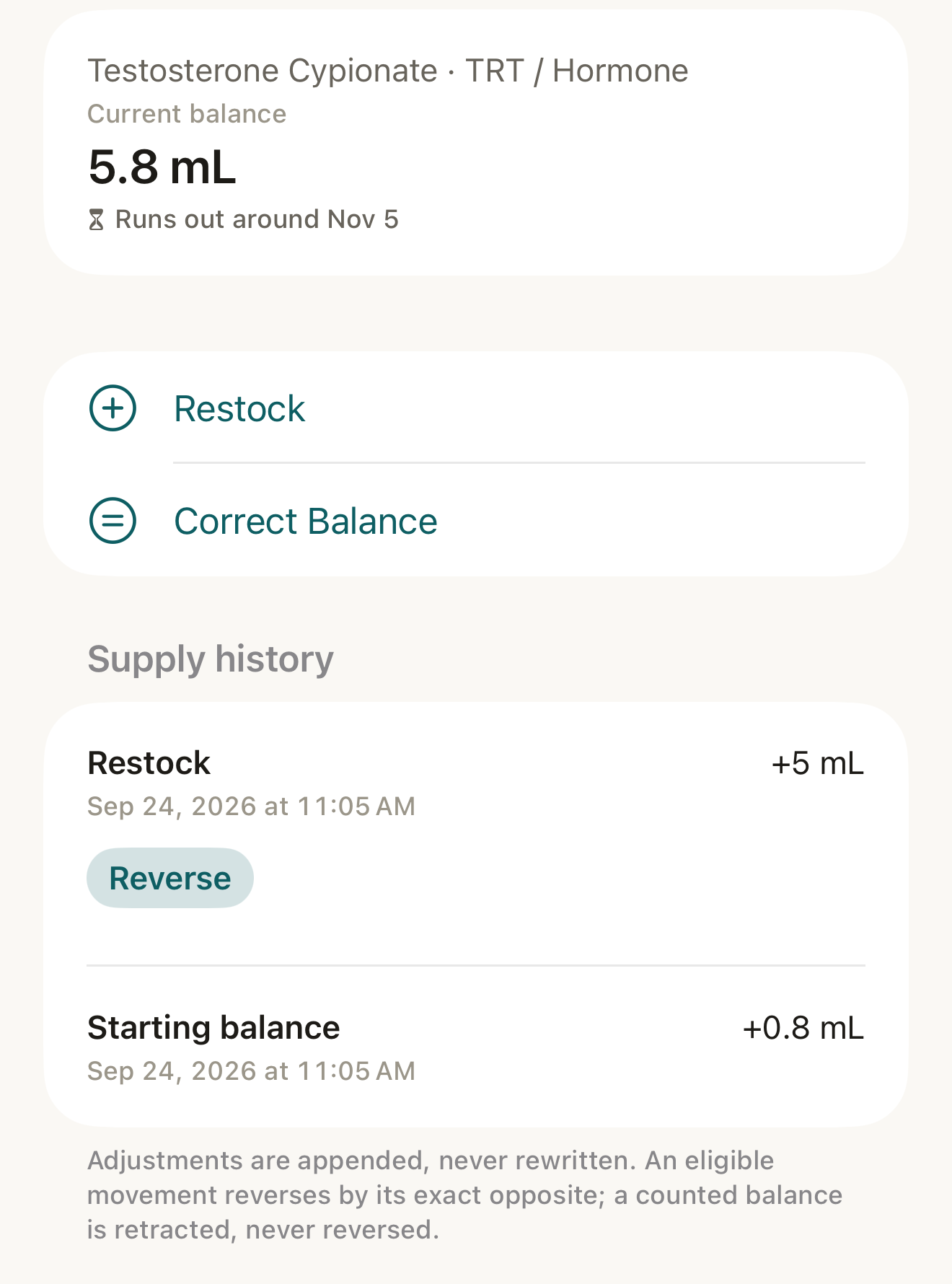
Fictional record: after a restock the balance updates and the history gains a row with a Reverse button; rows are appended, never edited. - Current balance 5.8 mL
- Restock +5 mL row
- Reverse
- footer "Adjustments are appended, never rewritten…"
Where this screen comes from
- File
C8-F1-profile-supply-history.png(1320×1780);C8-F1-profile-supply-history.webpis a lossy encode of it- Derivative SHA-256
05ee1acb476f29e91bdd6ec8e0d19931a9dbc49bd9b706c61667f3b139d534c0- Source
C8-F1.pngin packageKeel-WT-7e41269-guide-figures-B2-20260924-111151-1756- Source SHA-256
9790ec18638776c26f3ebd7413aafccbdbe68ca8f42f4f6b01036507fac72457- Package seal
f9b0083234734b6b16f58e455596067bde9182e8e0ff62c5e84cdfae8ad22c6f- Captured from
- Keel 1.0.0 (1), implementation
working tree 7e41269 (NOT a candidate; head 7e4126919da3a44a9ad2f2efaf3ad2467c1fbff7, build-input tree c863167fe1474c471d3562fe90f5f107c9598edff3903cdfc58b89bc7ae3032c, build build-20260924-103514-93133) - Operation
- crop x0 y440 w1320 h1780 (source pixels, origin top-left)
The numbered markers are drawn by the page, not into the image.
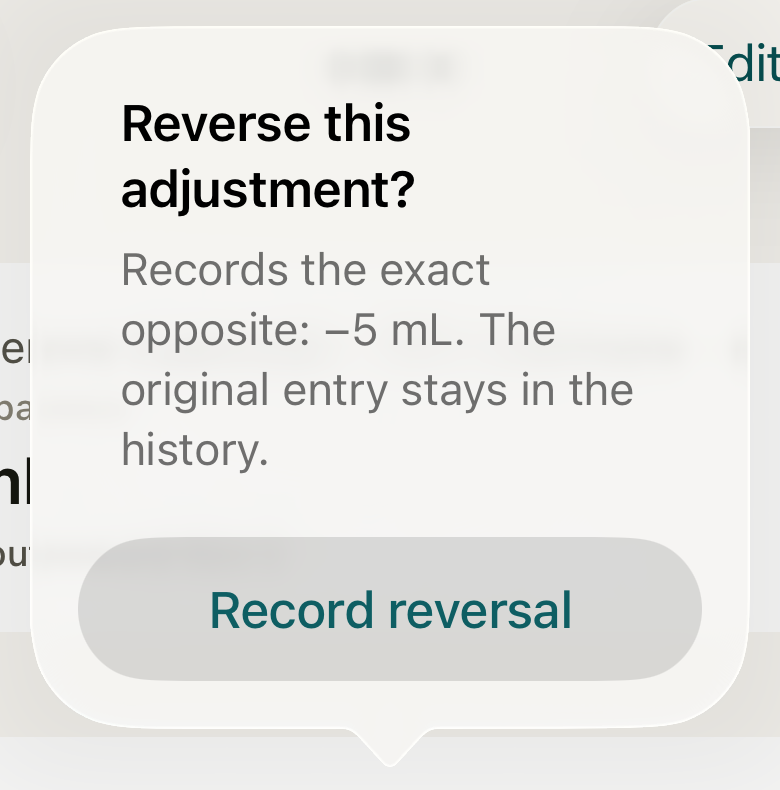
Reverse records the exact opposite — here −5 mL — and leaves the original row in place. DisclosureNo Cancel button is drawn on this dialog; tap outside it to dismiss.
- the opposite amount
- Record reversal
Where this screen comes from
- File
C8-F2-reverse-adjustment-dialog.png(780×790);C8-F2-reverse-adjustment-dialog.webpis a lossy encode of it- Derivative SHA-256
6eb3b0171d31206ba8d047c8b7a2d2aafd7f050f1c83e0afdbabed6366c1b291- Source
C8-F2.pngin packageKeel-WT-7e41269-guide-figures-B2-20260924-111151-1756- Source SHA-256
a765c18087e4c5a3a58aaaf9d792ab2f50697445110b00a1147080afb0658acc- Package seal
f9b0083234734b6b16f58e455596067bde9182e8e0ff62c5e84cdfae8ad22c6f- Captured from
- Keel 1.0.0 (1), implementation
working tree 7e41269 (NOT a candidate; head 7e4126919da3a44a9ad2f2efaf3ad2467c1fbff7, build-input tree c863167fe1474c471d3562fe90f5f107c9598edff3903cdfc58b89bc7ae3032c, build build-20260924-103514-93133) - Operation
- crop x270 y190 w780 h790 (source pixels, origin top-left)
The numbered markers are drawn by the page, not into the image.


Retract
- On a Counted balance row tap Retract › Retract this count? — "Removes the counted fact as though it never applied. The original entry stays in the history." › Retract count.
What changes
The original row stays, its amount struck through and marked Reversed or Retracted; a reversal adds a Reversal row with the opposite amount, a retraction a Count retracted row; Current balance returns to what the remaining rows say. "Adjustments are appended, never rewritten."
Where: The profile’s Current balance and Supply history
If it looks different
- No button on a Consumption row?
- A dose’s own draw-down is undone by undoing the dose, never here.
- "That adjustment was already reversed.", "A reversal can’t be reversed.", "That count was already retracted.", "A count can’t be reversed. Retract it instead.", "A retraction can’t be reversed."?
- The row is not eligible.
- "That reversal didn’t save — the balance is unchanged. Try again in a moment." / "Couldn’t save the retraction. Your data is unchanged — try again."?
- Nothing changed; try again.
Conflicting counts
- When two counted balances disagree (for example from two devices) the profile shows a Conflicting counts section listing each count ("6 mL, recorded <date>") with Keep this count, and the note "Counts disagree. The balance is unsettled until the conflict is resolved."; the list row shows no figure and no Low mark; a new count is refused with "Two counts disagree. Resolve the conflict before recording a new count."
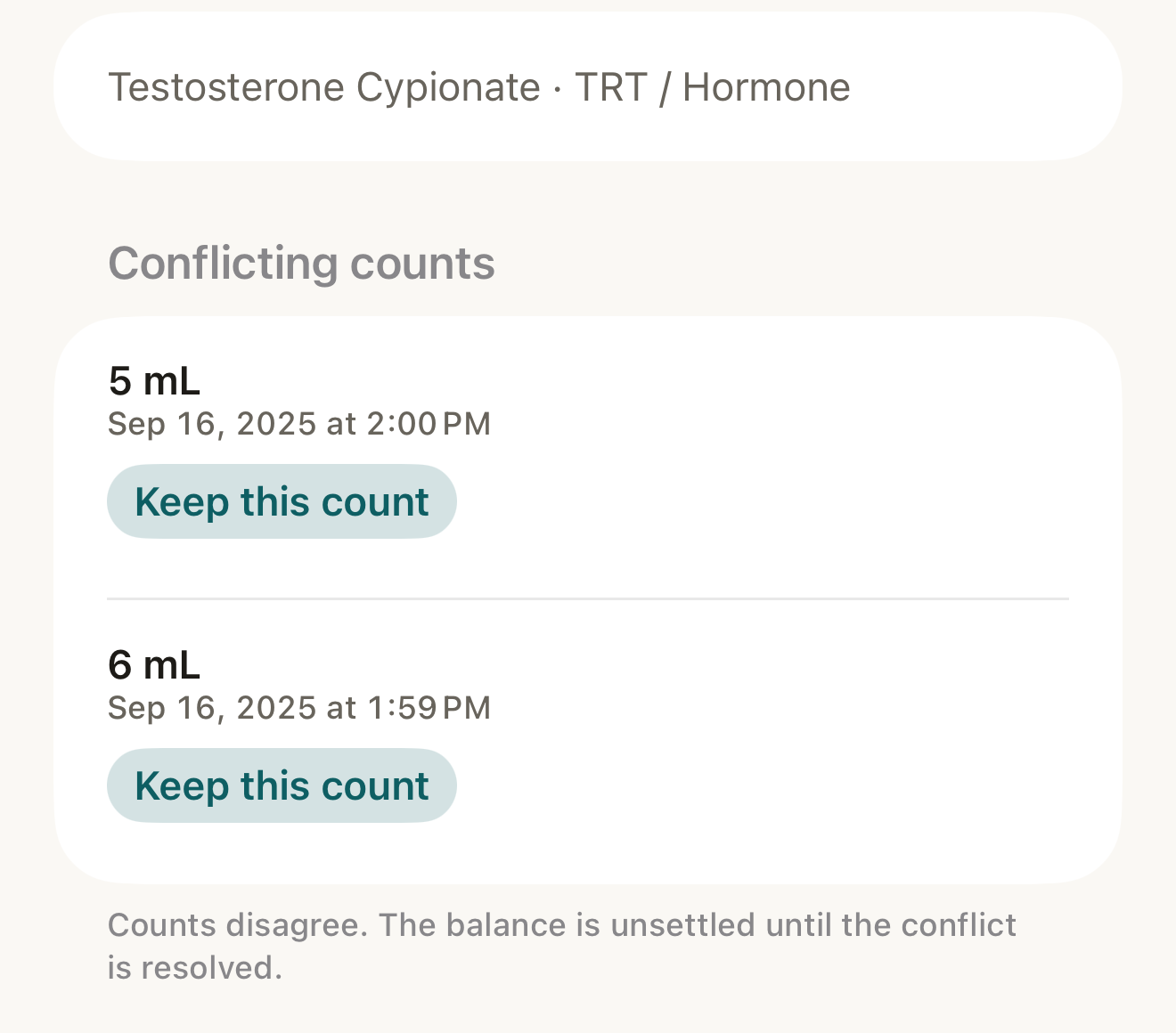
Fictional conflict: two counted balances disagree, so the balance is unsettled until you keep one; nothing is deleted. - "Counts disagree…" note
- the two counts
- Keep this count
Where this screen comes from
- File
C8-F3-conflicting-counts.png(1320×1160);C8-F3-conflicting-counts.webpis a lossy encode of it- Derivative SHA-256
b63ce05fca7bc492bb563caed8104434c574b5a1f88ec6389948a60610a4e40c- Source
C8-F3.pngin packageKeel-WT-7e41269-guide-figures-B2-20260924-111151-1756- Source SHA-256
afd1e49f01cf05887a044b78a71204707ae189e2f005193affd349d3dce33d5c- Package seal
f9b0083234734b6b16f58e455596067bde9182e8e0ff62c5e84cdfae8ad22c6f- Captured from
- Keel 1.0.0 (1), implementation
working tree 7e41269 (NOT a candidate; head 7e4126919da3a44a9ad2f2efaf3ad2467c1fbff7, build-input tree c863167fe1474c471d3562fe90f5f107c9598edff3903cdfc58b89bc7ae3032c, build build-20260924-103514-93133) - Operation
- crop x0 y440 w1320 h1160 (source pixels, origin top-left)
The numbered markers are drawn by the page, not into the image.
- Tap Keep this count › Keep this count? — "Keeps 6 mL and retracts the other counts. Nothing is deleted from the history." › Keep count. A count dated before a newer one is refused: "A newer count already covers that date. Date this count after it."

Reversing or retracting corrects your own record; Keel never decides which count is right.