Keel · Guides · Reminders & Widgets
Set up reminders
How do I turn reminders on?
Open Manage routines, edit the routine, and find Reminders.
AvailabilityFree
Where reminders come from
Open Manage routines, edit the routine, and find Reminders. Use the schedule you already follow; a reminder is a notification about that record.
Reminders
- Turn on Remind me.
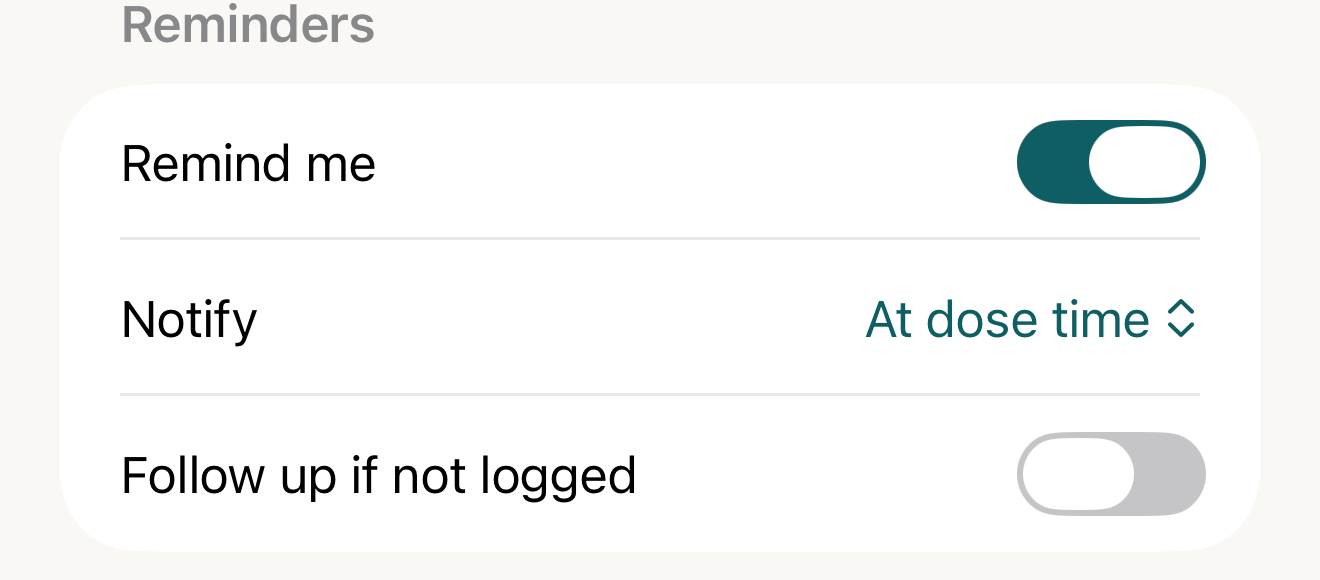
The routine controls its own reminders; early notification and follow-up timing are separate choices, and saving commits the changes. - Remind me
- Notify
- Follow up if not logged
Where this screen comes from
- File
G6-F3-reminders-section.png(1320×580);G6-F3-reminders-section.webpis a lossy encode of it- Derivative SHA-256
11c4e5203cc25784618f40d12ba39ed8322f3645bac8386becf90dd23b13e802- Source
G6-F3.pngin packageKeel-V1-4cbadaa-guide-figures-B-20260910-165828-62385- Source SHA-256
ed4be842bbb5f9d313920cb0239d06ab0724e5931f8fddc4e75b47882baf4574- Package seal
df48d7c70fb742b308677bf5d03a694f9122cc628b75451b9814645da1b37b52- Captured from
- Keel 1.0.0 (1), implementation
4cbadaa1c63a0678b61e703583fadc9af226267d(reused-unchanged) - Operation
- crop x0 y1290 w1320 h580 (source pixels, origin top-left)
The numbered markers are drawn by the page, not into the image. Full provenance.
- For a timed routine, choose Notify: At dose time, 5, 15 or 30 minutes early, or 1 hour early.
- If wanted, turn on Follow up if not logged.
- If follow-up is on, set After to the delay you want; the control offers 5–240 minutes in five-minute steps.
- Tap Save.

What a reminder says
The normal title is the routine name. In Settings › Notifications › Reminder detail, Show "Routine due" only hides that name; it does not erase other notification text. A timed reminder says Due at the dose's effective time. An any-time reminder says Due today — any time, has no early Notify picker, and is scheduled for 9:00 AM on its day. The privacy choice takes effect as reminders are rescheduled.

- Reminder detail
- the two choices
Where this screen comes from
- File
B4-F1-2-reminder-detail-picker.png(1320×700);B4-F1-2-reminder-detail-picker.webpis a lossy encode of it- Derivative SHA-256
cbaf9835c7db4e6d937b50b46c7685b62d33e793ffb34d6c015ab2f46a917b60- Source
B4-F1-2.pngin packageKeel-WT-7e41269-guide-figures-B4-core-20260924-132808-25483- Source SHA-256
5308eadcf2882e6f2fbf45f579fb1aafaac8a183e187cffb04badb1dca864327- Package seal
92635fa4590819076023273798dc062eafb248db36057e2854ea6827c1c04ea7- Captured from
- Keel 1.0.0 (1), implementation
working tree 7e41269 (NOT a candidate; head 7e4126919da3a44a9ad2f2efaf3ad2467c1fbff7, build-input tree e68d5177c4229cbfc9a88a9e8bdad667ebf011692826b6bd4359833508618f28, build build-20260924-124300-17106) - Operation
- crop x0 y1270 w1320 h700 (source pixels, origin top-left)
The numbered markers are drawn by the page, not into the image.
Actions
Done records Taken at now and uses the same timed/any-time lateness rules as logging in the app. Skip records a skip. Notification Snooze uses the routine's first snooze duration, normally 15 minutes; the button is present but does nothing for an any-time dose. A previous Move still outranks a snooze.
What changes
Keel schedules requests; iOS decides delivery.
Where: Reminders
If it looks different
- The follow-up is measured from the dose's reminder anchor, not from an early primary reminder.
Permission denied
Use the Today permission notice to reach iOS Settings.
Notes
- Reminder settings can sync; notification delivery belongs to each device.
Reminders repeat your entered schedule; they never tell you what to take.