Keel · Guides · Settings & Pro
Buy, restore or manage Pro
How do I restore my purchase?
Open Settings › Plan.
AvailabilityFree
Open Settings › Plan. Buying is optional; read the feature comparison and the current App Store terms before choosing.
Buy
- Tap Get Keel Pro.

Structural illustration from an earlier build: the two panels show navigation and plan choices; prices are masked and the monthly card is cut at the source edge. - Not now
- Compare
Where this screen comes from
- File
G3-F2a-paywall-top-bar.png(1320×244);G3-F2a-paywall-top-bar.webpis a lossy encode of it- Derivative SHA-256
096711f2a0211412f1bfae30ed51634f9dabcd57930d2b367e353e129d434efa- Source
store-6-paywall.pngin packageKeel-V1-4cbadaa-store-listing-20260908-1619- Source SHA-256
fea06142706306d826b1f9298f7af080555177dfd53e4d1a49a4b91a9b206572- Package seal
bb6bb8cb8f301a369afef5cc37180914f5d7196376f0be585127f6cb51993aa6- Captured from
- Keel 1.0.0 (1), implementation
4cbadaa1c63a0678b61e703583fadc9af226267d(reused-unchanged) - Operation
- crop x0 y186 w1320 h244 (source pixels, origin top-left)
The numbered markers are drawn by the page, not into the image. Full provenance.
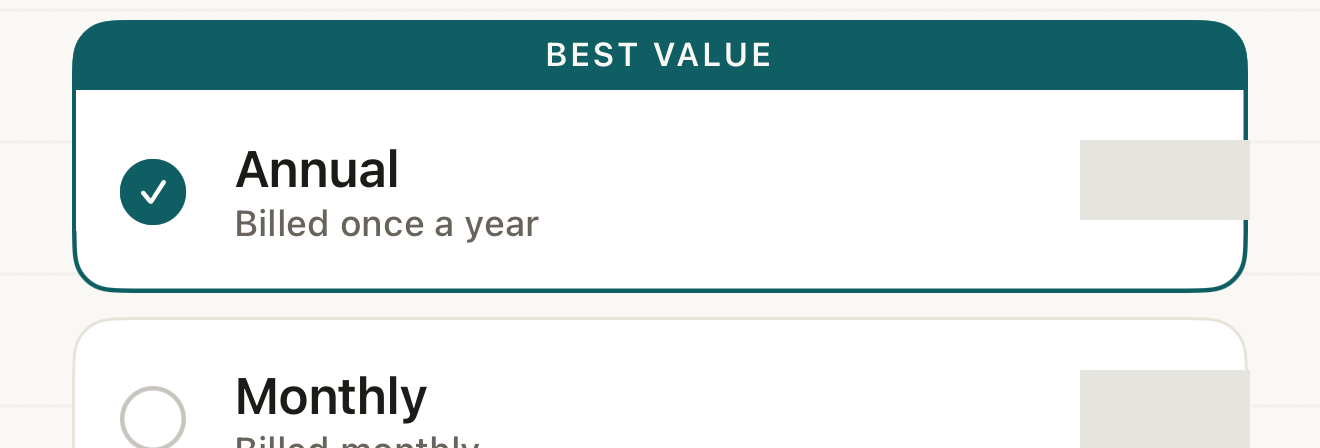
Structural illustration from an earlier build: the two panels show navigation and plan choices; prices are masked and the monthly card is cut at the source edge. - plan cards
Where this screen comes from
- File
G3-F2b-paywall-plan-cards-masked.png(1320×448);G3-F2b-paywall-plan-cards-masked.webpis a lossy encode of it- Derivative SHA-256
6aca7691081111a325e5e3a8e38a444eaa91748771b45c9d940ba3c36c50a2b4- Source
store-6-paywall.pngin packageKeel-V1-4cbadaa-store-listing-20260908-1619- Source SHA-256
fea06142706306d826b1f9298f7af080555177dfd53e4d1a49a4b91a9b206572- Package seal
bb6bb8cb8f301a369afef5cc37180914f5d7196376f0be585127f6cb51993aa6- Captured from
- Keel 1.0.0 (1), implementation
4cbadaa1c63a0678b61e703583fadc9af226267d(reused-unchanged) - Operation
- mask x1080 y2560 w170 h80 #E6E4DE; mask x1080 y2790 w170 h78 #E6E4DE; crop x0 y2420 w1320 h448 (source pixels, origin top-left)
The numbered markers are drawn by the page, not into the image. Full provenance.
- Choose the annual or monthly plan shown.
- Review its displayed price, billing period and any offer actually available to you.
- Choose Start My Free Trial, Continue with Annual, or Continue with Monthly only if you want the displayed offer, then follow Apple's confirmation. Not now closes the selling sheet.


DisclosureCaptured from a Release build on a newly created dedicated simulator after a fresh signed-out onboarding; the build identity is verified externally from its products, and no debug row or price is shown. Nothing was purchased or restored.
- Current plan
- comparison
- restore
Where this screen comes from
- File
B4-F10-2-settings-plan-free.png(1320×768);B4-F10-2-settings-plan-free.webpis a lossy encode of it- Derivative SHA-256
5846e9d8bb6234af9810838c57f60b1057aa51671925bb28d03e415e895a1d7e- Source
B4-F9-1.pngin packagelearn-keel-release-plan-capture-20260925-r3/package- Source SHA-256
5f489464eab30212bc5cf2c39f4a2e4d1cce4f0ac593361da8304573e2f99b3b- Package seal
23381d5bb6926a814def0fe64651acb2e914c2eaadf60ef95eed4a4dfcb6f5fe- Captured from
- Keel 1.0.0 (1), implementation
working tree 7e41269 + integrated method candidates (NOT a candidate; head 7e4126919da3a44a9ad2f2efaf3ad2467c1fbff7; Release bound build keel=de3f003f65340bf595b6cf911c32427f813ccbd7d169a9e60b934ba073c9c993, outputs/learn-keel-release-plan-build-20260925-r4) - Operation
- crop x0 y2100 w1320 h768 (source pixels, origin top-left)
The numbered markers are drawn by the page, not into the image.
Restore
- Tap Restore Purchases when you expect access from your Apple account. Wait for the result. Purchases restored. and No purchases to restore on this Apple ID. are different outcomes; a restore is not a new purchase.
Manage
- With Pro active, use Manage subscription to open Apple's subscription settings. The owned sheet describes verified access; an Access through date is an access boundary, not a new recommendation or a promise of renewal.
Account and store
A Keel sign-in and an Apple subscription are different identities. A trial is shown only when the app has the relevant product and eligibility information. For an eligible annual offer with a loaded product, the timeline shows Today, a pre-renewal reminder conditional on notification permission, and the first charge after the displayed trial unless cancelled. This guide fixes neither a price nor a trial length; use Apple's confirmation for your account's terms.
If it looks different
- If it looks different
- Purchasing stays disabled until a product is available. Restore does not require a product card to have loaded. Pending approval, cancellation and failure are not active access. If a purchase completed but the app could not activate Pro, follow its Restore Purchases message or the recovery guide.
A subscription unlocks record-keeping features; it does not supply medical advice.