Keel · Guides · Insights & Records
Note, edit or remove a side effect
Where do I write down what I noticed?
Three routes: Tools › Records › Side Effects › Log a side effect; an open dose row's Log side effects; a routine's detail › Note a side effect.
AvailabilityPro feature — readable on Free
Where to start
Three routes: Tools › Records › Side Effects › Log a side effect; an open dose row's Log side effects; a routine's detail › Note a side effect. On Free each shows a Pro badge and opens the membership sheet.

- Log a side effect
- a row's strength word
- linked routine line
- footer
Where this screen comes from
- File
E4-F1-side-effects-list.png(1320×1500);E4-F1-side-effects-list.webpis a lossy encode of it- Derivative SHA-256
7a7eaf2f3e554c32c5e6e6a62f32e8935f19608c2c255370a56760592340bb15- Source
E4-F1.pngin packageKeel-WT-7e41269-guide-figures-B3-20260924-113146-8354- Source SHA-256
bd3adde8e54ce7942d96c4a00de23a59a81804f377922ef51ee6e7941d70982a- Package seal
cf5364a44a6ef64b3262580c6efc582072c104c37e70f96070f9c35ac6d4c167- Captured from
- Keel 1.0.0 (1), implementation
working tree 7e41269 (NOT a candidate; head 7e4126919da3a44a9ad2f2efaf3ad2467c1fbff7, build-input tree c863167fe1474c471d3562fe90f5f107c9598edff3903cdfc58b89bc7ae3032c, build build-20260924-111522-2644) - Operation
- crop x0 y186 w1320 h1500 (source pixels, origin top-left)
The numbered markers are drawn by the page, not into the image.
The form
- The sheet is New Side Effect.
Note
- Under What you noticed, tap a chip — grouped as Injection site, Skin & hair, Sleep & energy, Mood & cognition, Digestive, Head & body, Fluid & heart-feel, Sexual & reproductive — or type your own words ("e.g. Headache, trouble sleeping").
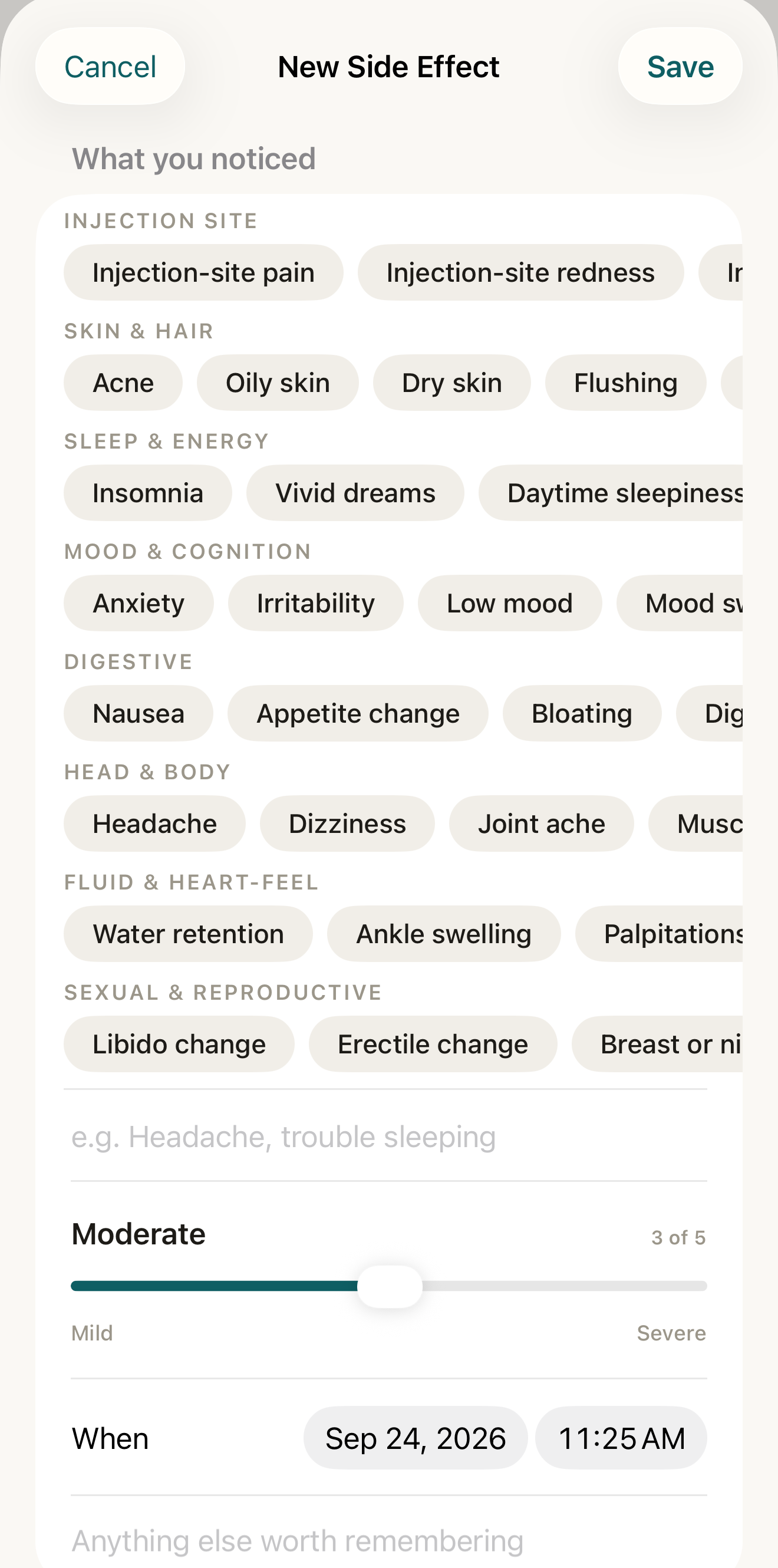
The note form: pick or type what you noticed, set how strong and when, and add a note; the Link section below lets you attach a routine or one logged dose. - What you noticed chips
- strength slider and n of 5
- When
- note field
Where this screen comes from
- File
E4-F2-new-side-effect-form.png(1320×2660);E4-F2-new-side-effect-form.webpis a lossy encode of it- Derivative SHA-256
1a326c4ec9b0709f3502491b5f493e723d5048be66054fbe1d798840783475af- Source
E4-F2.pngin packageKeel-WT-7e41269-guide-figures-B3-20260924-113146-8354- Source SHA-256
eb302ff5c3ff12ec26c6b8aaec89e4c3d2e5ebd704d5d274f899b7e2dadcf744- Package seal
cf5364a44a6ef64b3262580c6efc582072c104c37e70f96070f9c35ac6d4c167- Captured from
- Keel 1.0.0 (1), implementation
working tree 7e41269 (NOT a candidate; head 7e4126919da3a44a9ad2f2efaf3ad2467c1fbff7, build-input tree c863167fe1474c471d3562fe90f5f107c9598edff3903cdfc58b89bc7ae3032c, build build-20260924-111522-2644) - Operation
- crop x0 y200 w1320 h2660 (source pixels, origin top-left)
The numbered markers are drawn by the page, not into the image.
- Set strength with the slider: 1 Mild, 2 Noticeable, 3 Moderate, 4 Strong, 5 Severe, shown as "n of 5".
- Set When (not in the future); add a note under Anything else worth remembering if useful.
- From the list, Link (optional) lets you choose Routine (or None) and Specific dose (or Whole routine). Routine-detail and pending-dose entry instead fix Logging under the routine. Only entry from a logged dose attaches that specific log and says "This note attaches to the dose you logged, alongside the routine."
- Tap Save. Can't save yet says "Name what you noticed." or "Strength must be from 1 to 5."

Edit
- Tap the row › Edit Side Effect; every field is editable; the sheet closes only when a save commits — a failed save keeps it open with your edits and states why.
Link is context, not causation
"Linking is optional — attach this to a routine or one logged dose to see it in context." The list shows each note with its strength word, date and time, linked routine and note; "Keel keeps what you record and shows it without interpretation." A routine that is no longer active shows "· inactive" in the picker.
Correct a mistake
Swipe the row › Delete, or in the editor tap Delete side effect › Delete this side effect? — "This removes the record. Your routines and dose history are untouched." › Delete. "Couldn't delete" leaves the record and the editor as they were.
Context, not causation
Keel keeps what you record and shows it without interpretation.
A side-effect note is your own observation on record; Keel never links it to a cause or advises what to do about it.