Keel · Guides · Insights & Records
Record a blood panel
How do I enter my lab results?
Tools › Records › Blood Panels — "Your lab results on record — values, units, and ranges without interpretation".
AvailabilityPro feature — readable on Free
Tools › Records › Blood Panels — "Your lab results on record — values, units, and ranges without interpretation". On Free the row shows a Pro badge.
A panel
- Tap Log a panel. The sheet is New Panel: under Panel, a Panel name ("e.g. Annual bloodwork") and Collected date.
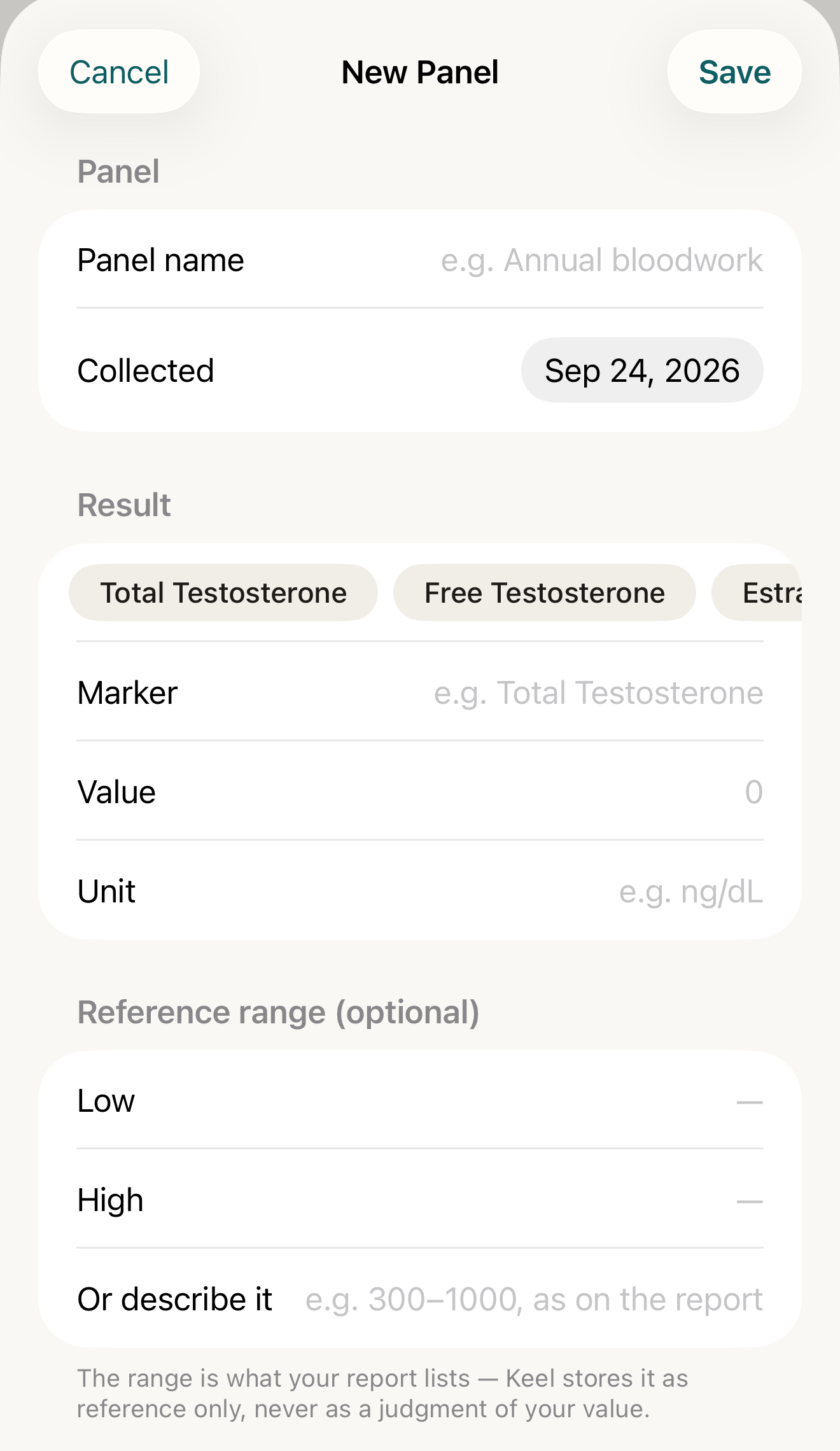
The panel form: name and date once, then each marker's value, unit and the range as printed — stored as reference, never a judgment. - Panel name / Collected
- Marker / Value / Unit
- Low / High / Or describe it
- footer
Where this screen comes from
- File
E5-F2-new-panel-form.png(1320×2280);E5-F2-new-panel-form.webpis a lossy encode of it- Derivative SHA-256
7b9880306e967b69e9f7c5e06405539a3c5ed657a48036ebf22c7ea198125e7a- Source
E5-F2.pngin packageKeel-WT-7e41269-guide-figures-B3-20260924-113146-8354- Source SHA-256
4da6dc4aa733cfac6f46fbd09c26ef34779066c9f99aabe5a08fb7a2dee301d6- Package seal
cf5364a44a6ef64b3262580c6efc582072c104c37e70f96070f9c35ac6d4c167- Captured from
- Keel 1.0.0 (1), implementation
working tree 7e41269 (NOT a candidate; head 7e4126919da3a44a9ad2f2efaf3ad2467c1fbff7, build-input tree c863167fe1474c471d3562fe90f5f107c9598edff3903cdfc58b89bc7ae3032c, build build-20260924-111522-2644) - Operation
- crop x0 y200 w1320 h2280 (source pixels, origin top-left)
The numbered markers are drawn by the page, not into the image.
- Under Result, enter Marker, Value and Unit.
- Under Reference range (optional), enter Low and High, or use Or describe it for a text range. It is stored as reference, never as a judgment.
- Add Notes if you like, then Save.

More results
- Under the panel tap Add result; the Add Result sheet inherits the panel's name and date, so enter the result fields.
Previous
A row shows "Previous 612 ng/dL · <date>" when an earlier result has the same marker AND the same unit — the most recent one collected before it. A result in another unit is skipped; the marker must match exactly, so "Total Testosterone" and "total testosterone" are two markers. Rows sort by marker; panels newest first.

- Total Testosterone
- value with unit
- Reference line
- Previous line
Where this screen comes from
- File
E5-F1-total-testosterone-row.png(1320×470);E5-F1-total-testosterone-row.webpis a lossy encode of it- Derivative SHA-256
b52913a4c81a53c5d18af5747225e8bac9962a0e86255c59ddf3d01c3e8296fa- Source
E5-F1.pngin packageKeel-WT-7e41269-guide-figures-B3-20260924-113146-8354- Source SHA-256
9e0227ec9cd1c39377d7635dad6de42aa63d9799bed91b7826d1fc03efb31c47- Package seal
cf5364a44a6ef64b3262580c6efc582072c104c37e70f96070f9c35ac6d4c167- Captured from
- Keel 1.0.0 (1), implementation
working tree 7e41269 (NOT a candidate; head 7e4126919da3a44a9ad2f2efaf3ad2467c1fbff7, build-input tree c863167fe1474c471d3562fe90f5f107c9598edff3903cdfc58b89bc7ae3032c, build build-20260924-111522-2644) - Operation
- crop x0 y1860 w1320 h470 (source pixels, origin top-left)
The numbered markers are drawn by the page, not into the image.
Edit a result or panel details
Tap a row › Edit Result changes marker, value, unit, reference and notes; only a committed save closes it. The panel's ⋯ menu › Edit panel details › Panel Details changes the name and Collected date for every result in it.
Delete a result
Swipe a row › Delete, or in the editor Delete result › Delete this result? — "This removes the one marker. Other results in the panel are untouched." › Delete. There is no panel-level delete: a panel disappears when its last result is deleted; "Couldn't delete" leaves everything as it was.
If it looks different
- "Panel details vary across results." under a panel
- its results carry different names or dates; Edit panel details aligns them.
- Can't save yet
- Can't save yet identifies missing marker/value/unit, invalid range numbers, an incomplete numeric pair, or mixing numeric and text ranges.
- "This result no longer exists." / "This panel no longer has any results to edit."
- removed on another device.
Check the saved number
- Value, Low and High keep digits and the first separator but strip signs;
0.125can save as125. Check the saved value against the report. If a value cannot be represented accurately, do not save a different number.
Keel stores the values, units and ranges from your report; it never marks a result high, low or out of range and never interprets it.